My wife is a Foundation 1 teacher — her first year in F1 after spending several years in F2 where Tapestry worked well for tracking children’s progress. Moving down to F1 meant a different challenge: tracking 20-odd children against the EYFS Development Matters indicators across eight areas, with a much lighter administrative overhead than F2 demands. The existing tools felt like overkill for what she actually needed, so I built her something simpler.
It’s a small side project — a proof of concept really — but it’s been an interesting problem to think through and I wanted to write up what we built and why.
The problem with existing tools
There are established EYFS tracking platforms out there and many schools use them. They’re not bad, but there’s a common complaint from teachers I’ve heard: the better the tool gets at monitoring, the more it demands. Evidence uploads, observation notes, detailed justifications for every assessment point. What starts as a tracking tool becomes an administrative burden that pulls time away from actual teaching.
The EYFS Development Matters guidance is intentionally non-prescriptive. These are indicators, not mandatory checkpoints. The framework exists to help teachers think about where children are, not to generate a paper trail. A lot of software seems to have forgotten that.
For a single F1 teacher tracking a large mixed cohort of full and part-time children across eight areas of development, the overhead needs to be minimal. The insight needs to be immediate.
What we actually built
The tracker is a simple web app. There’s no evidence upload, no observation notes, no elaborate workflow. A child either has a baseline recorded and a date they achieved a target, or they don’t. That’s it.
The dashboard gives an instant cohort overview — every area, with a completion percentage and a clear highlight of where the group is weakest. In the screenshot below you can see sample test data mid-year: Communication and Language is tracking well at 62%, but Understanding the World at 20% and Literacy at 30% are flagged as needing attention.
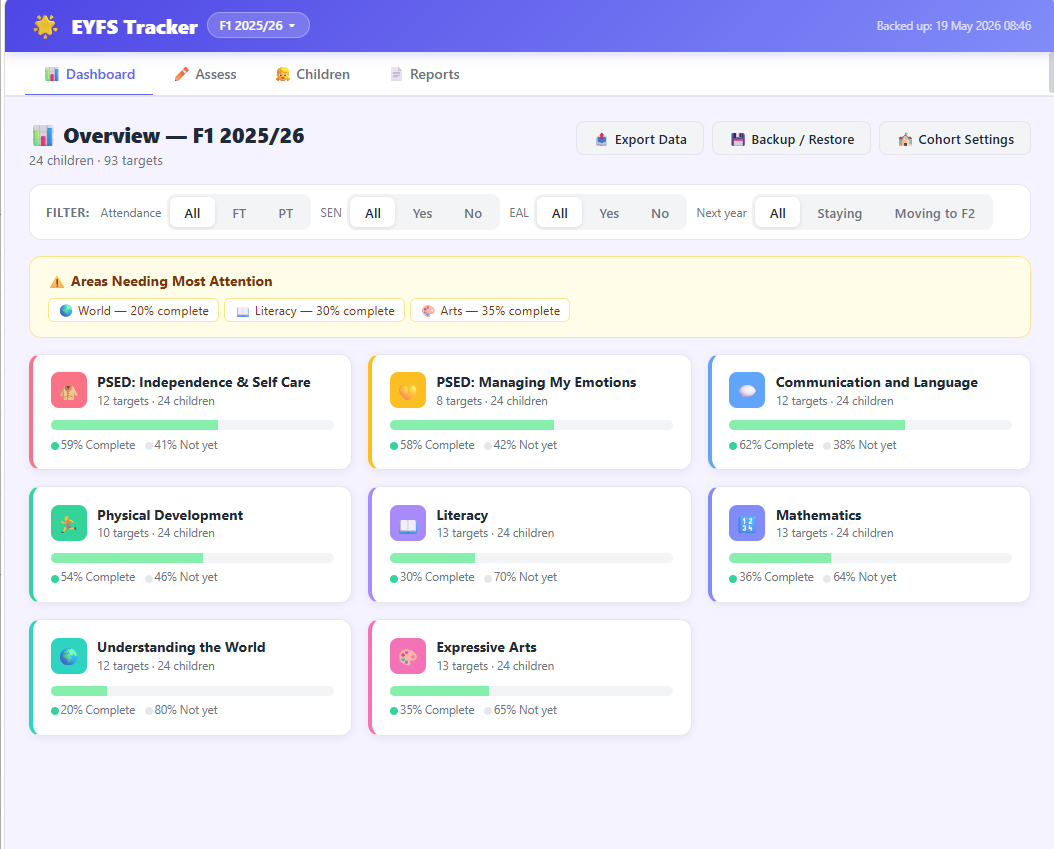
The filter bar at the top is where it starts to get genuinely useful. You can slice the whole cohort view by Full Time / Part Time attendance, SEN status, EAL status, and whether children are staying in F1 or moving to F2. A teacher can immediately see whether low progress in a particular area is spread across the class or concentrated in a specific group — that’s the kind of insight that’s very hard to extract from a spreadsheet.
The features that matter
Individual tracking with baseline and achievement dates. Each child’s record shows when they were assessed against each target and when (if) they achieved it. This gives a timeline rather than just a snapshot.
Cohort analysis by area. The dashboard rolls everything up into the eight EYFS areas — PSED (split into two sub-areas), Communication and Language, Physical Development, Literacy, Mathematics, Understanding the World, and Expressive Arts. Progress bars and percentages give you the shape of the cohort at a glance.
Group filtering. The FT/PT, SEN, and EAL filters apply across the whole dashboard, not just a table view. If you want to understand how part-time children are tracking in Communication and Language compared to full-time children, two clicks gets you there.
End-of-year reports. Teachers can generate a summary report for a child that includes both the teacher’s and headteacher’s comments. These go out to parents at the end of the year and the app handles the formatting — no more assembling a report from half a dozen places.
What’s next
Right now this is a PoC. It’s been loaded with sample data for testing and so far the feedback has been positive — it’s faster to use than a spreadsheet and the cohort view flags things that would otherwise stay hidden until the data was manually aggregated. Whether it’s actually better in practice over a full year is still to be seen.
If it proves its worth, we’ll think about whether it makes sense to make it available to other schools. The core idea — strip it back to what teachers actually need, keep the overhead as low as a tick sheet, and surface the insights that matter — feels like it’s in the right place. But we’ll let real use be the judge of that.